 I really like Microsoft Office 2010, which is set to be released during the first half of 2010. Sure, I'm a geek and sorta like a fanboy, but at the same time I really like OpenOffice and web office apps like those from Google, ThinkFree and Zoho. Still, as I was opted-in to try out the beta version of Microsoft's next suite of MS Office, I want to write a little about what I think about it, and mind you, I'm hereby consciously excluding Outlook, Access, Infopath, the SharePoint server services, Publisher, OneNote, Visio, Communicator and SharePoint Workspace (formerly known as Groove) from this review.
The pros
-
It's fast. I think MS pondered how to make the suite work faster. True, getting MS Office speedier usually is one of the last things Microsoft concentrates on before shipping MS Office, but this time it's out-of-the-box good so far.
-
By clicking the Office button in any of the Office apps, you used to see the only drop-down menu that was left after MS introduced the ribbon in MS Office 2007, but now that's gone as well; instead there's something that MS has named Microsoft Office Backstage, which takes up the entire screen. It basically gathers everything you can do to output what you've created/opened in MS Office. Smart. Here's a little film I've shot that shows Microsoft Office Backstage; do note that Print Preview is now meshed into Backstage instead of opening a separate window. That and the printing options are designed well. I also love how Backstage lets you link URLs and web-sites to a document, from the Info category, really nifty! Here's Backstage:

- Paste Preview. This also flows through most of the MS Office 2010 applications. If you copy something, then either click the arrow below the paste button or just paste the contents somewhere and then press Ctrl on your keyboard, you'll get to see a gallery containing different paste options; it's also application specific, so while in MS Excel 2010 you will see options like Paste Formulas, Paste Formulas & Number Formatting and Transpose, it looks like this in MS Word:

By holding the mouse pointer over any item you get to see the item previewed live, i.e. before clicking. I've recorded this little film that shows the two different methods.
- Insert screenshot. In almost every MS Office 2010 application there is now, under the Insert menu, the option to take a screenshot and automatically have it inserted in your current work; you can do this either by picking a screen-shot from a gallery - which consists of previews of full-size screen-shots of every window you have open in Windows - or by capturing a region. Here's a shot of this:

- Office File Validation. This is essentially a great security-enhancer. If you try to open a file in an MS Office format older than 2007, it gets checked to see that it conforms to the new standards; if not, it's opened in Protected View, a sandboxed environment and - according to Microsoft - "Even if the file is malicious, it can't get out of the sandbox and do harm to your computer or data." ((As told here.))
Another plus is that Microsoft Office 2010 will warn you every time you open a file you've downloaded from the Internet, and you are forced to click an Edit-button if you want to make changes, like here:

-
OpenType typography! What's this, then?
Microsoft are finally including support for so-called OpenType typography, which means that a) fonts will behave different than before by using ligatures, kerning metrics, stylistic sets, and other features, and b) people who are interested in typography won't be half as vexed as before. In MS Office 2010, you'll find all of the new typographic options through Fonts: Advanced.
A new font, Gabriola, is introduced with Microsoft Office 2010 as well as Windows 7. This is a very good PR font that allows the use of the OpenType stylistics, e.g. the cool twirls seen in the screen-shot below, which you could not do in previous versions of MS Office:
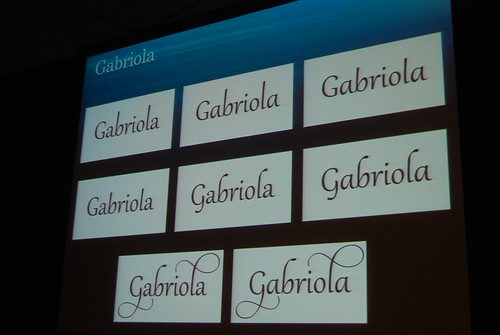
Of course, the stylistics only work with fonts that support the OpenType typography and contain the technology required to make letters dance on page.
- Sparklines in Excel 2010. In Excel 2007, Microsoft introduced conditional formatting that allowed charts to display within cells, without a user having to Insert: Chart. In Excel 2010, Microsoft introduces Sparklines, that display like the pic below:
.gif)

- Slicers in Excel 2010. Anybody who's ever made a pivot table knows it's a pain to filter results after you've created your pivot table; Slicers help you do this really nicely on-the-fly.
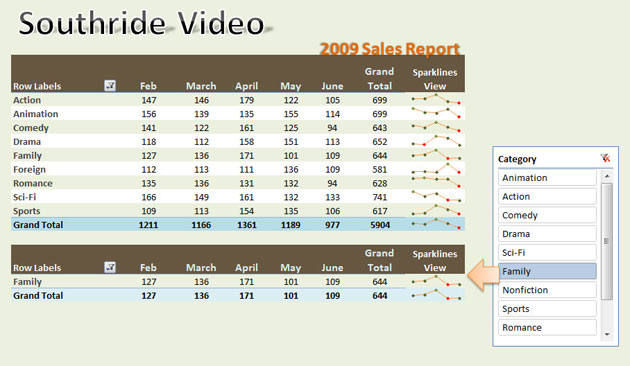
I'll quote Paul Thurrott on how Slicers work ((Culled from here.)):
Slicers appear as separate objects on the spreadsheet and then can be moved around and resized like charts and graphs. Slicers are live--so as data changes in the underlying PivotTable, the Slicers are updated as well--and interactive, meaning that you can select filter fields on the fly.
-
Accessibility checker. Finally, Microsoft have included a way to "scan for information in your document that people with disabilities could have difficulties reading", according to MS Word 2010. Problem is, when I opened a very simple, text-only .docx document that I created using Word 2007 and tried to check it, MS Word 2010 said "Problem running the accessibility checker. Cannot check the current file type for accessibility issues." Eh, say no go. When I - only disabilities including asthma and some allergies - cannot even use the service, there's disability issues, alright. I've used the Send-A-Smile button for this, and of course dispatched a frown.
-
Microsoft Web Applications 2010
Yep, the Microsoft Office suite is finally coming to the web. It's said to work flawlessly both on Firefox and Safari, but we'll see about that. I wouldn't want to be the system admin that upgrades Firefox/Office 2010 and unleashes the wrath of my users... Also, the web versions do not contain the full functionality of the desktop version of the Office 2010 suite.
The biggest pro with this is that users will be able to work together on Word documents simultaneously. On the other hand, Zoho, ThinkFree and others have been doing this for quite some time with their online apps.
A video from Microsoft on the web apps:
-
Image editing: background removing. Wee! Now you can easily insert a picture in Office 2010, and by a couple of clicks remove the background so that only what's in the foreground of the picture ends up in your file. Presto. Nice, Microsoft.
-
Video editing in PowerPoint 2010. Apart from the new option to embed videos through web sites (just paste the embed code after you click through Insert: Video: Video through online site), we now have video editing! Woo! Only simple editing, but it's point and click, actually:

-
Office Mobile 2010
Microsoft introduce Office Mobile 2010, that allows you to - through installation of SharePoint server technology - view Office files that are online; these will be rendered by the SharePoint server, and of course the pro with this is that you'll always be able to see the very latest versions of the files. I've no idea if some type of push-technology will be incorporated ((And if so, most likely only for users of smartphones running Windows Mobile.)), that would be able to let you know when content has been changed. Very little is said about Office Mobile 2010 so far. This video says little but shows a tad of the interface on some smartphone.

Here's a bit from a Microsoft sales pitch on the matter:
-
32-bit and 64-bit versions of Office 2010 are available. If you're using big files containing huge amounts of data, e.g. gigabyte-sized Excel spreadsheets, you'll fare much better using the 64-bit version of MS Office 2010.
The cons
- Outlook 2010 will render HTML e-mails by using Word 2010; this might sound like little to gripe about, but there are a lot of web-savvy people out there who hate the notion of this. Basically, it means Microsoft - who have pushed their desire to move further towards open standards - are yet again going against the grain. This picture shows the problem easily:
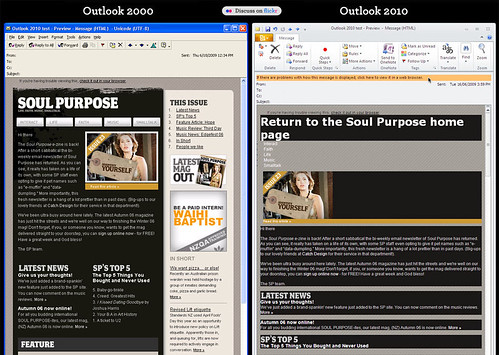
This site is dedicated to fixing this issue, with more than 25,000 tweets supporting it.
This means for the next 5 years your email designs will need tables for layout, have no support for CSS like float and position, no background images and lots more.
-
What happened to Microsoft Office Mobile Device?
-
Office 2010 only gives its all if you're running Windows 7, which is Microsoft's coming operating system which will be released on 2009-10-22; for instance, this is what the Windows 7 Jumplist can look like when right-clicking the Outlook button in the task bar.

Click as you might, there is nothing like that in previous versions of Windows; not that they support Jumplists, anyway...
Also, Windows 7 brings DirectWrite:
Many of today's applications need to support high-quality text rendering, resolution-independent outline fonts, and full Unicode text and layout support. DirectWrite, a new DirectX component, provides these features and more [...] DirectWrite also provides low-level glyph rendering APIs for developers who want to perform their own layout and Unicode-to-glyph processing. ((Culled from pages 34-35 of Windows 7 Developer Guide.))
In plain English, this enables users of Windows 7 to display fonts more clearly than users of previous versions of Windows.
Final words
So, what do I make of it?
Well, to individual users of Microsoft Office 2007 I'd say don't upgrade unless you need the tweaks mentioned above, and to corporate users I'd say if you really need what the new SharePoint-based (e.g. live chatting through the apps using Office Communicator) and the mobile features bring to the table, go forth.

Even though pricing has not been established at the point of this going to post, there will be five different editions available:

All in all, there are a lot of cosmetic changes involved that I haven't mentioned as they're quite tiny. Still, I do love how Microsoft have created good-looking icon images for improvement of the ribbon (mostly in MS Outlook 2010), but also elsewhere, e.g. in MS Word 2010, where sifting through the gallery of templates is concerned. I also like how MS Excel now default auto-saves files; imagine you're editing a saved spreadsheet in Excel, you quit Excel and answer "Don't Save" on whether you'd like to, you start up Excel again and hit the Backstage, where you see your recent files; there you'll find the one you didn't save, titelled "[file name] (when I closed without saving)". Nice. There's also a new Mini Translator built-into MS Office 2010. MS Word 2010 contains a new Navigation Pane that kills the previous experience by being really straight-forward; it also allows you to search and find words and phrases very easily.
Little things like that are really nice. And, as first mentioned, Office 2010 is really fast. I've tried it both on an Asus Eee 1000H netbook and a HP Compaq desktop computer, and I'm a very happy camper. Visually, I feel as though Microsoft has cleaned up the user interface on MS Office 2010 in comparison with MS Office 2007. It's the little things, and I'm really looking forward to see what will be changed as MS Office 2010 is subject to change, new features, removal of features et.c. Exciting!
Microsoft technical preview sales pitch on the main apps:
Word 2010
Excel 2010
PowerPoint 2010